
Property CGI is the single most effective visual tool for marketing homes and developments before they exist, or before they look their best. It lets developers sell off-plan earlier, gives agents richer listing creative than a photograph ever could, and helps architects win over planning committees with accurate, verified views. Used well, it speeds up buyer decisions and raises perceived value across the whole campaign.
TL;DR:
- Exterior CGI hero shots typically take a couple of weeks to produce once the model is finalized and should include planning drawings for consistency.
- Verified planning views require survey data, longer lead times, and higher costs but are essential for official submissions and pre-application consultations.
- Interactive 3D tours, such as pre-rendered, browser-based, or kiosk models, can significantly increase buyer engagement and shorten sales cycles, especially for off-plan schemes.
- Using a single, experienced studio to produce all CGI assets in-house ensures consistency, reduces revisions, and helps meet tight deadlines for planning and marketing campaigns.
- Proper briefing with clear specifications, milestones, and usage rights prevents common pitfalls like scope creep, technical mismatches, and costly last-minute reworks.
Table of Contents
- What is property CGI for marketing?
- How does interior CGI improve listings and brochures?
- What makes a photomontage ‘verified’ for planning?
- When should you use 3D walkthroughs over static images?
- What return on investment does CGI marketing deliver?
- How do you brief a CGI studio without wasting budget?
- Evidence that experienced studios deliver reliably
- How does CGI integrate with AR and VR marketing tools?
- What are the common challenges in producing property CGI?
- What do successful CGI marketing campaigns have in common?
- Author perspective: commissioning CGI in practice
- How Visualtrick supports your next launch
- Sources
- FAQ
What is property CGI for marketing?
Property CGI for marketing covers a family of visual formats, not one product. Computer-generated imagery is photoreal 2D and 3D image work built by software to show buildings, interiors and landscapes that don’t yet exist, or exist but aren’t camera-ready. The same underlying 3D model can output a hero image for a brochure cover, a street scene for a planning application, or an animated flythrough for a sales suite screen.
That range is the point. CGI spans still renders, animation and interactive 3D, and each format suits a different stage of the buyer journey and a different audience. A planning officer needs an accurate, annotated view with sightlines and scale. A buyer scrolling Instagram needs a striking hero image that stops the thumb. Both come from the same source model, which is why briefing the right format matters as much as choosing a studio.
Exterior CGI: hero shots, street scenes and aerials
Exterior renders are usually the first thing a developer commissions, and they carry the most weight in a campaign. Three formats do most of the work:
- Hero views show the completed building at its most flattering angle, typically used on brochure covers, hoardings and the top of a landing page.
- Street scenes place the development in its immediate context, useful when the surrounding streetscape adds credibility or when the design needs to feel grounded rather than isolated.
- Aerial and contextual renders show scale, layout and proximity to transport or amenities, which works well for masterplan marketing and investor decks.
- Verified views match a precise camera position and lens to a real photograph, mainly for planning submissions rather than campaign creative (covered in more detail below).
Briefing a studio for exterior work means supplying the architectural model files, site photography or drone imagery, orientation data, and enough context about neighbouring buildings and landscaping that the render doesn’t look like it’s floating in a void. Turnaround for a single hero exterior typically runs to a couple of weeks once the model is locked, with high-resolution stills delivered as TIFF or PNG files sized for both print and web use.
Pro Tip: Send your studio the planning drawings even for marketing-only renders. Consistency between your marketing images and your submitted plans avoids awkward questions later if a buyer or planning officer compares the two.
How does interior CGI improve listings and brochures?
Interior CGI closes the gap between an empty shell and a home a buyer can picture living in, which is exactly why virtual staging has become standard on new-build listings. A single interior space can be rendered several ways depending on what the campaign needs:
- Photoreal stills showing finished, furnished rooms as they’ll realistically look.
- Lifestyle scenes with styled furniture, natural light and small human touches that suggest a lived-in home rather than a showroom.
- Staged variants of the same room in different finish specifications, useful for buyers choosing between packages.
- Finish switches swapping flooring, worktops or cabinetry within one render set, cheaper than commissioning entirely new scenes.
Interiors map directly onto specific channels: listing platforms want clean, well-lit stills; brochures want a mix of wide-angle context and detail shots; paid social often performs better with a tighter crop and warmer lighting. A good interior CGI brief includes floorplans, a finishes schedule, a short furniture and styling brief, and the lighting mood you’re after, whether that’s bright and neutral or warm evening ambience.
For web use, ask for images optimised for responsive sizing and lazy loading. A brochure-resolution TIFF loaded straight onto a listing page will crawl on mobile data, which undoes the whole point of a striking render.
What makes a photomontage ‘verified’ for planning?
A verified photomontage is a CGI image locked to a real, surveyed camera position, so what the viewer sees is provably accurate rather than an artist’s impression. That distinction matters enormously to a planning authority, because unverified renders can be dismissed as marketing rather than evidence.
Verification typically involves:
- Survey control, tying the camera position to accurate ground coordinates rather than an estimated viewpoint.
- Sightline accuracy, matching lens focal length and height so scale reads correctly against existing buildings.
- Coordinate fits, overlaying the proposed structure onto verified topographical and mapping data.
- Annotated deliverables, including scale bars, camera position references and metadata that a planning officer or objector can check.
The same underlying image often serves two different audiences. Planning committees and the public use it as evidence during consultation; marketing teams use a related but less rigorously annotated version to sell the scheme. Studios usually flag this distinction clearly, because reusing a verified planning image as unlabelled marketing creative (or vice versa) can cause confusion.
Verified work costs more and takes longer than a standard exterior render, mainly because of the survey data required upfront. Budget for extra lead time if your submission has a fixed planning deadline, and confirm survey costs separately from the render fee itself. Planning visuals commissioned early, alongside your architect’s drawings, tend to move through committee with fewer queries than visuals bolted on at the last minute.
When should you use 3D walkthroughs over static images?
Static renders sell a scheme’s look. Interactive tours sell the experience of moving through it, which matters most where a buyer can’t yet visit the real building.
Three formats dominate this space, and picking the wrong one wastes budget:
- Pre-rendered animations are fixed flythroughs, cinematic and polished but not explorable. Good for sales presentations and investor pitches where you control the room.
- Browser-based real-time tours let a buyer navigate freely from any device with an internet connection, ideal for embedding on a development’s own website.
- Kiosk or tablet interactive models run in sales centres, often combined with floorplan overlays and unit availability, giving prospects a hands-on session with a sales negotiator present.
Interactive 3D sales platforms let buyers explore a scheme themselves and generate engagement data that sales teams can use to spot which prospects are genuinely interested. Presenting units, floorplans and availability together in one interactive tool tends to shorten the gap between first interest and reservation, because buyers get more of the information they need without waiting for a callback.
Pro Tip: Decide your primary device (kiosk tablet, desktop browser, or mobile) before the studio starts modelling. Real-time assets built for a touchscreen kiosk usually need reworking for a lightweight mobile embed, and that rework costs more than specifying it upfront.
What return on investment does CGI marketing deliver?
The commercial case for CGI rests on a few measurable outcomes: earlier off-plan sales, stronger buyer confidence at first viewing, and richer creative for every paid channel a campaign runs. Buyers deciding between a floorplan sketch and a photoreal render consistently find the render easier to commit to, because it removes the guesswork a technical drawing demands.
Asset choice should follow the channel. Social ads perform better with a tight, high-impact hero crop; out-of-home hoardings need a wide, legible composition that reads at speed; brochures and listings can carry more detail and multiple angles. High-quality CGI creative tends to support stronger advertising performance and clearer buyer decision-making than basic architectural drawings or low-resolution renders.
Worth tracking against these assets:
- View time and scroll depth on listing pages using interactive tours.
- Click-through rate on paid social creative built from CGI stills versus drawings.
- Lead-to-reservation rate once a prospect has viewed an interactive walkthrough.
- Any measurable uplift in achieved sale price for units marketed with premium visual packages.
Cost drivers worth understanding early: animation and verified views cost more than static stills, fast turnaround adds a premium, and revision rounds beyond an agreed number usually incur extra fees. Most campaigns recoup CGI spend through faster off-plan reservations alone, before counting the value of stronger brand perception.
How do you brief a CGI studio without wasting budget?
A weak brief is the single biggest cause of wasted revisions and slipped deadlines, so get the groundwork right before the first call.
- Gather your source material: architectural model files, site photography or drone footage, a finishes schedule, and a clear list of the deliverables you actually need (hero stills, interior sets, animation, verified views).
- Set milestones and review rounds upfront, agreeing how many revision passes are included and who signs off at each stage, so approvals don’t stall mid-project.
- Request source files and variant counts in writing, because a studio quoting “one render” and one quoting “one render plus three finish variants” are pricing very different jobs.
- Clarify usage rights and archival formats before work starts: whether you own the final images outright, how long the studio retains source files, and whether you can request future variants from the same model without a full rebuild.
Budget conversations get easier once you understand the levers. Animation, verified planning work and rushed turnaround all add cost; batching several exterior and interior assets from one model, and giving the studio realistic lead time, brings the per-image cost down considerably.
Pro Tip: Ask upfront whether the studio keeps your 3D model on file. A studio that retains the model can produce new marketing variants months later, cheaper than commissioning a fresh build if the finishes or unit mix changes.
Evidence that experienced studios deliver reliably
Choosing a studio comes down to trust in delivery, not just portfolio quality. Visualtrick produces all imagery in-house through a single, experienced operator, which means no outsourcing, direct communication with the person doing the work, and workflows built around each project’s actual purpose rather than a generic template.
That matters most where deadlines are tight or a submission is going to committee. Common project outcomes from an in-house studio setup include:
- Planning submission images that meet a council’s verified-view requirements without a second agency involved.
- Brochure hero renders and interior sets delivered as one coordinated package rather than piecemeal commissions.
- Virtual tours built from the same base model used for the static marketing assets, avoiding duplicated modelling costs.
When evaluating any studio, ask to see a portfolio of comparable projects, confirm who actually produces the work, and get a written turnaround estimate before committing.
How does CGI integrate with AR and VR marketing tools?
Static and animated CGI is the raw material that AR and VR tools then repurpose. A 3D model built for a brochure render can, with the right optimisation, become the asset that powers an augmented reality app letting a buyer point a phone at an empty plot and see the finished building overlaid on the real view. The same model, reworked for a game engine, becomes a virtual reality headset experience for a sales suite.
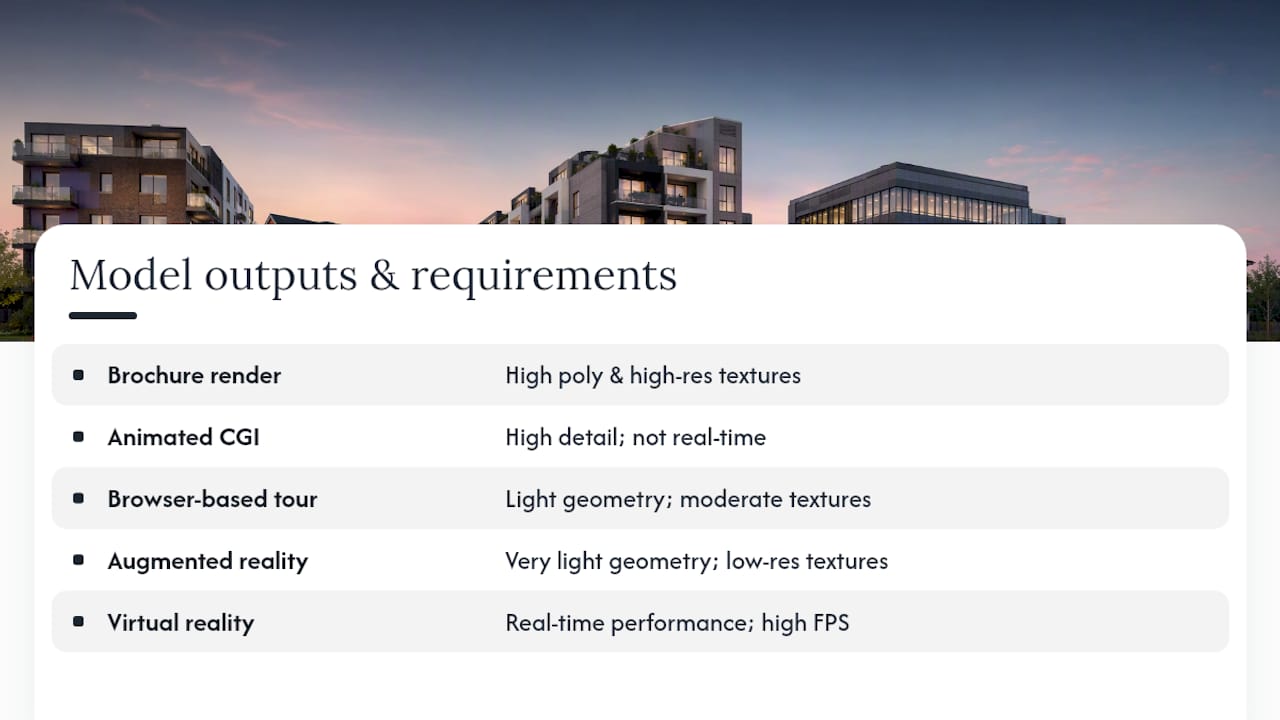
The practical challenge is that these formats have very different technical demands from a print render. AR apps need lightweight, well-optimised geometry that runs smoothly on a mid-range phone. VR headset experiences need real-time performance at a consistently high frame rate, or users get uncomfortable within minutes. Neither tolerates the polygon count or texture resolution that a still render can carry without issue.
Most developers don’t need a bespoke AR or VR build for every launch. A simpler, high-value step is a browser-based interactive tour that runs on any device without an app download, which covers most of the buyer engagement benefit without the extra production cost of a dedicated headset experience. Reserve full AR or VR builds for flagship developments or investor presentations, where the novelty and immersion genuinely justify the spend.
Whichever route you choose, plan the AR or VR requirement at the briefing stage, not after the marketing renders are finished. Retrofitting a print-optimised model for real-time use usually means rebuilding significant parts of it from scratch.
What are the common challenges in producing property CGI?
The most frequent problem is a mismatch between what’s briefed and what’s actually needed by the time the campaign launches. A developer commissions a single hero render, then discovers mid-campaign they also need social crops, a brochure spread and an animated version, all pulled from a model that was never built with those outputs in mind.
Timeline pressure causes the second most common issue. Verified planning views and complex animations take longer than most non-specialists expect, and rushing them increases the risk of errors that a planning officer or sharp-eyed buyer will spot. Building in realistic lead time from the outset, and flagging any hard deadlines to the studio at the briefing stage, avoids most of this friction.
Finishes and specification changes create a third recurring headache. Developers often finalise cladding colours, landscaping or unit layouts after renders are already in production, forcing rework that eats into both budget and schedule. Locking specification decisions before commissioning, or explicitly briefing which elements are still provisional, keeps revision counts manageable.
Technical mismatches between formats cause a subtler problem. A model optimised for a photoreal still render is often too heavy for a real-time walkthrough or an AR app without significant rework, as noted above. Briefing all the intended outputs, print, web, interactive and any AR or VR use, at the same time lets a studio build one model efficiently rather than several incompatible ones. Clear communication between the developer, architect and studio at every stage, with a single point of contact rather than a chain of intermediaries, resolves the majority of these issues before they become expensive.
What do successful CGI marketing campaigns have in common?
The strongest property CGI campaigns share a pattern: one consistent 3D model feeding every channel, rather than separate commissions for each asset. A masterplan render used for investor decks, a set of interior stills used across listings and social, and an interactive tour embedded on the development’s own site all draw on the same underlying model, which keeps the visual identity consistent and the production cost down.
Off-plan launches benefit most visibly. A development marketed purely with floorplans and a artist’s sketch struggles to convert early interest into reservations, because buyers can’t picture the finished product. Add a photoreal exterior hero, a furnished interior set and a browser-based walkthrough, and the same prospect has enough information to commit well before groundworks finish.
Care and retirement living schemes show a similar pattern from a different angle: buyers in that market often can’t visit a show home easily, so interior CGI showing accessible layouts and communal spaces does much of the persuasive work that a physical viewing would otherwise handle. Marketing agencies working across property development increasingly treat CGI as core creative infrastructure rather than a one-off asset, feeding the same renders into brochures, digital ads and sales presentations throughout a launch.
Planning-led projects tell a slightly different success story. Schemes that commission verified views alongside marketing renders early, rather than treating planning visuals as an afterthought, tend to move through committee with fewer objections rooted in visual misunderstanding, freeing the campaign timeline to focus on sales rather than resubmissions.
Author perspective: commissioning CGI in practice
The developers who get the most from CGI treat the brief as seriously as the design brief itself: clear specification, agreed review rounds, and rights confirmed before work starts. Skip that groundwork and you pay for it in revisions, not savings. Get it right once, and the same model keeps paying for itself across every channel you launch next.
— Paride
How Visualtrick supports your next launch
Visualtrick is the alternative to juggling separate agencies for renders, planning visuals and virtual tours. Everything, from exterior CGI and interior CGI through to CGI photomontage and verified views, is produced in-house by one experienced operator, so you’re briefing a single person rather than a chain of subcontractors, and getting workflows built around your project’s actual purpose rather than a generic template.
That matters most when a launch deadline and a planning deadline land in the same month. Rather than coordinating two separate suppliers, one for marketing creative and one for verified planning work, you get both from a studio that already understands your project, your model, and your timeline. If you’re planning a launch, a sales suite refresh, or a planning submission, start by reviewing the full services overview and get in touch to brief your project.
Sources
FAQ
What is CGI in property?
Property CGI is photoreal 2D and 3D imagery generated by software to show buildings, interiors or landscapes before they’re built or before they’re photograph-ready, used for marketing, brochures and planning submissions.
What are the 4 Ps of marketing in real estate?
The 4 Ps, product, price, place and promotion, apply to property the same way they do elsewhere: the scheme itself, its pricing strategy, the channels it’s sold through, and the creative used to promote it, where CGI typically forms a core part of the promotion element.
What is SEO in property?
SEO in property marketing means optimising listing pages, brochures and campaign content so they rank well in search results, and strong visual creative, including CGI, supports SEO indirectly by increasing time on page and reducing bounce rates.
What is the best way to market a property?
There’s no single best method, but combining accurate CGI (exterior, interior and, where needed, interactive tours) with the right channel mix, listings, social, brochures and sales suite, consistently outperforms relying on photography or drawings alone, particularly for off-plan schemes.
How much does property CGI cost?
Pricing depends on the format, verified planning views, animation and fast turnaround all add cost, and current rates are available directly from Visualtrick on request for your specific project.
