
Commission a compact CGI package for your next tender: one exterior key view, one or two interior shots, and clear material callouts, adding a brief walkthrough or 4D phasing sequence only when logistics or build sequencing form part of the evaluation criteria. This works because it removes ambiguity for evaluators who cannot read a construction drawing, and it does so without burying your strongest points under a pile of unnecessary imagery. Before you brief a studio, get your drawings finalised, lock your material schedule, and agree sign off dates that sit safely ahead of the submission deadline.
- Exterior key view showing context, scale and material palette
- One or two interior views proving usability and finish quality
- Annotated material callouts for high value or contentious specifications
- A short walkthrough or 4D phasing sequence, if sequencing is scored
- Sign off dates fixed against the tender’s own submission deadline
Key Takeaways
A tender-grade CGI package works because it converts technical claims into verifiable visual evidence that non-technical evaluators can trust and act on quickly.
| Point | Details |
|---|---|
| Keep the package compact | One exterior key view, one or two interiors, and material callouts beats a large unfocused set of renders. |
| Match format to evaluation criteria | Only commission a walkthrough or 4D phasing sequence when sequencing or logistics are actually scored. |
| Specify planning-grade accuracy | Request dimensionally accurate visuals tied to drawing revisions, not just marketing-grade polish. |
| Add provenance to every image | Include assumptions, model version and coordinate references so visuals survive an audit. |
| Brief Visual Trick early | Visual Trick builds tender and planning-grade CGI with BIM linkage, briefed against your programme from the outset. |
Table of Contents
- Why CGI for tender submissions actually changes evaluator decisions
- What CGI assets actually belong in a tender pack
- What resolution and file formats does a tender submission need?
- How do you brief a CGI studio for a tender deadline?
- How much does tender-grade CGI cost and how long does it take?
- Checklist: getting visuals into the tender document correctly
- Why fewer, sharper renders beat a full portfolio dump
- How Visual Trick supports tender teams
- Sources
Why CGI for tender submissions actually changes evaluator decisions
Bid evaluators are rarely engineers. Most sit on procurement panels judging value, risk and deliverability from documents they read once, quickly, alongside a dozen competing submissions. A technical drawing tells them almost nothing. A well composed render tells them exactly what they’re buying.
High fidelity 3D rendering can turn a tender from a dense technical document into a persuasive visual argument, and Construction Review Online treats it as a central plank of tender strategy for exactly that reason.
Integrated visual packages also move decisions faster. The Architect’s Diary reports that combining renders with walkthroughs and 360° content speeds decision cycles and supports a stronger perceived value for the project on the table. Tie the imagery to your BIM model and programme data, and it stops being decoration. It becomes a verifiable claim about cost, sequencing and buildability that a sceptical panel can cross check.
What CGI assets actually belong in a tender pack
Not every asset earns its place. A tender pack works best as a tight sequence, each image doing a distinct job rather than repeating the last one from a slightly different angle.
- Exterior key view. This sets context, scale and material palette in a single frame. It’s usually the first thing a panel sees, so get the massing, landscaping and street relationship right.
- One or two interior views. These prove the finish quality and usability of the design, particularly for care, residential or commercial fit outs where the interior experience is part of the brief.
- Material callouts and close ups. Annotated detail shots of cladding, glazing systems or high spec finishes remove doubt about what’s actually being proposed versus what’s aspirational.
- A short walkthrough or 4D phasing sequence. Where site logistics, construction sequencing or phased handover are scored criteria, a 30 to 60 second animation communicates a plan far faster than a Gantt chart.
- Interactive panoramas. Useful when reviewers are dispersed and can’t attend a live presentation, letting them explore a space at their own pace.
Pro Tip: Rank your assets by which evaluation criterion they answer directly. If a render doesn’t map to a scored line item, it’s marketing collateral, not tender evidence, and it can wait for the next stage.
What resolution and file formats does a tender submission need?
Procurement teams accept work built to a specification, not guesswork. Requesting the wrong format is one of the most common reasons visuals get rejected or reworked at the last minute.
- Resolution. Request print masters at a minimum of 300 DPI at your intended print size, and web/digital versions at least 1920 by 1080 pixels for on screen review.
- File types. Ask for high resolution PNG or TIFF masters, MP4 (H.264) for any animation, and OBJ, FBX or IFC exports if the visual needs to link back into a BIM environment.
- Planning grade versus marketing grade. Planning grade visuals must be dimensionally accurate and tied to verified drawings; marketing grade imagery allows more creative licence with lighting, staging and dressing. A tender pack usually needs planning grade accuracy dressed with marketing grade polish, not one or the other.
- Metadata and provenance. Every image should arrive with an assumptions statement (season, lighting, occupancy) and a note on which drawing revision and model version it was built from. Visual Trick’s guidance on planning grade visual documents sets out exactly what this provenance record should contain.
- Coordinate references. If the CGI links to a BIM model, specify the coordinate system and IFC reference so the visual can be audited directly against the drawings.
Linking renders to BIM and cost data in this way turns them into a due diligence tool rather than decoration, which is precisely what a procurement panel is trained to look for.
How do you brief a CGI studio for a tender deadline?
A rushed brief produces rushed renders, and a tender deadline is the worst possible moment to discover that. Structure the process in clear milestones from the outset.
- Assemble the first brief pack. Send finalised drawings, BIM or IFC files, the material schedule, context photography of the site, and any brand or style guidance the studio needs to match.
- Agree milestones in writing. Concept sketch, first pass renders, one amendment round, final masters and handover, each with a date attached.
- Fix the number of revision rounds. Two rounds is typical for tender work. Tie the final freeze date to your submission deadline with several days of buffer, not zero.
- Set acceptance criteria upfront. Specify viewpoint coordinates, resolution targets and how closely materials must match samples or specification sheets, so sign off isn’t a subjective argument.
- Clarify usage rights. State plainly whether the licence covers tender use only, or extends into marketing after award, since this affects the studio’s pricing.
Pro Tip: Freeze your material schedule before the first render pass starts. A material swap halfway through a tender build is the single most common cause of blown deadlines and unbudgeted revision fees.
Visual Trick’s guide to presenting planning arguments visually covers a similar milestone structure and is worth reviewing before your first brief goes out.
How much does tender-grade CGI cost and how long does it take?
Lead times and budgets scale with detail level and format, not just the number of images. A single hero exterior render typically turns around faster than a full interior and exterior package with animation attached, and animation is where costs climb quickest.
- A standalone exterior or interior render generally needs the shortest lead time of any deliverable on this list.
- A combined interior and exterior package with several viewpoints takes longer, largely due to the extra modelling and material matching involved.
- A short walkthrough or 4D phasing animation is the most time and cost intensive item, driven by animation length and camera complexity rather than image count.
- BIM integration adds time upfront but saves revision cycles later, since geometry stays consistent across every view.
Keep costs down without weakening the submission by prioritising the views tied to scored criteria and reusing a single base model across your exterior, interior and phasing outputs rather than commissioning each from scratch. Ask your studio about milestone payments and quick turn support, since most tender-grade providers will flex payment structure around a fixed submission date.
Checklist: getting visuals into the tender document correctly
A strong render loses its value fast if it lands in the document without context. Every image needs a paper trail a panel member can follow without asking a question.
- Caption every image with what it shows, the date, and the drawing or model revision it was generated from.
- State assumptions plainly. Note lighting conditions, season and any occupancy assumptions directly beneath the image.
- Add a file reference and rights statement so the image can be traced back to its source file and its licence terms are unambiguous.
- Cross reference the narrative. Where a render illustrates a claim in your risk or programme section, point directly to the image by figure number.
- Check print and accessibility. Confirm colour profiles convert cleanly to greyscale, and that bleed and margins survive the client’s print or PDF template.
Pro Tip: Sequence visuals to follow the order evaluators score, not the order your design team produced them. A panel reading your risk register should hit the relevant phasing image on the same page, not three appendices later.
For guidance on sequencing longer visual narratives, Baby Love Growth’s notes on visual storytelling offer a useful framework for ordering images so each one builds on the last rather than repeating it.
Why fewer, sharper renders beat a full portfolio dump

Most bid teams get this backwards. They assume more imagery signals more effort, so they pad the appendix with every angle the studio produced, and the panel skims past half of it. A compact, well specified package consistently outperforms a bloated one, because evaluators reward clarity and verifiable detail over sheer volume, not visual quantity.
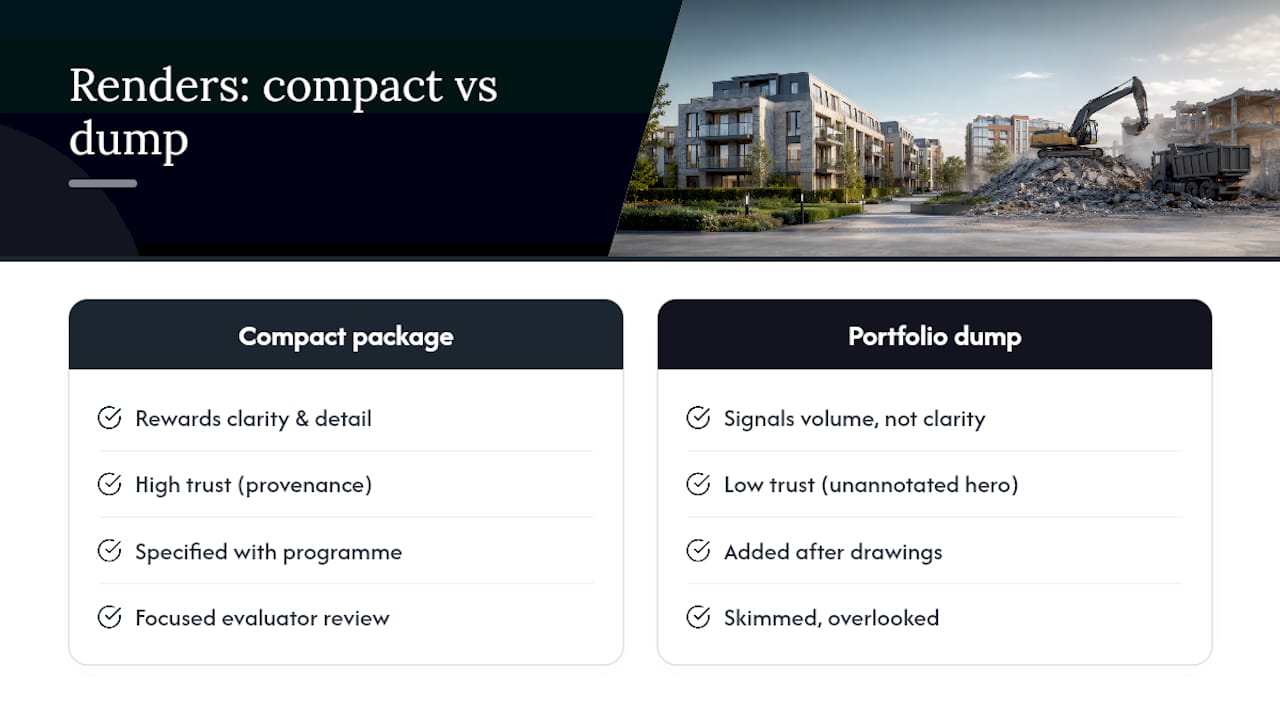
The conventional advice treats CGI as a marketing add-on bolted onto the technical proposal at the last minute. That’s backwards. Treat it as procurement infrastructure instead. Specify it at the same point you lock your material schedule and programme, not after the drawings are finished, and the renders will actually match what gets built rather than what looked good in an early concept pass.
If I had to pick the single highest leverage change for most bid teams, it wouldn’t be a bigger budget or a longer animation. It would be provenance. An unannotated hero render, however beautiful, invites a sceptical evaluator to wonder what’s been dressed up. A render with a dated assumptions statement and a model reference invites them to trust the rest of your submission too.
— Paride
How Visual Trick supports tender teams
Visual Trick specialises in planning-ready and tender-grade CGI, built with BIM linkage so your visuals stay traceable back to the drawings a panel will cross check against.
For bid teams working to a submission deadline, Visual Trick delivers the exact package this guide sets out: exterior key views, interior shots, annotated material callouts and short walkthroughs, each supplied with the assumptions and provenance detail procurement panels expect from planning-grade documents. The 3D rendering services page sets out typical deliverables and formats, and the architectural visualisation service covers planning and tender work specifically for developers, architects and care operators. If your next submission has a fixed date attached, get in touch to request a tender brief quote and lock your milestones before the drawings are even finished.
Sources
- The Bid Winner: Leveraging High‑Fidelity 3D Rendering Services to Secure High‑Value Construction Contracts
- The visualization premium: how high‑quality renderings boost sale prices by up to 9% (and close deals 31% faster)
